SV Operations
These sections give an overview of some of the functionalities enabled through your SV node as well as general information useful to SV node operators.
Security Notice
Warning
As an SV operator, you are most welcome to review, install, and use third-party Daml apps provided you install third-party Daml apps on a validator node separate from your SV node.
Installing additional Daml apps on an SV node is not supported and may compromise its secure
operations. In particular, please refrain from manually uploading additional .dar files
to your SV node or manually connecting it to third-party synchronizers.
For more information on hardening your SV node, see Security Hardening.
Generate a validator onboarding secret
If you want to onboard a new validator, you can obtain a one-time use onboarding secret directly from the SV web UI.
The onboarding secret expires after 48 hours.
To generate this key you need to login into the SV web UI and navigate to the Validator Onboarding tab. In that tab, click on the button to create the secret and copy the last generated onboarding secret.
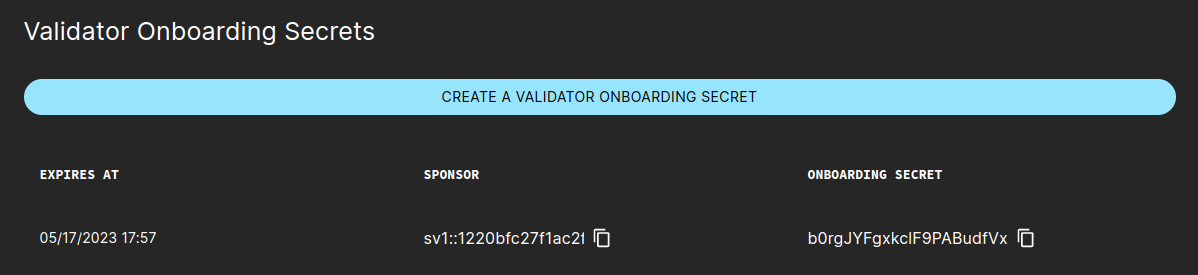
Using the secret, the validator operator can follow this instruction to prepare for validator onboarding.
Identities used by SV nodes on different layers
This section gives a brief overview over some of the most important identities associated with a single SV node, and for each type of identity: its role and relevance for quorums (if any), under what circumstance it can be reused, and the implications of losing it (e.g., by loss or compromise of relevant cryptographic keys).
Each identity is relevant on different layers, or within different subsystems, of the Canton & Global Synchronizer software stack. We strive to reduce coupling between layers, so that in general it is possible to rotate identities independently of each other.
SV identity
Used for identifying your node before it was onboarded to the system. See Generating an SV identity.
Established SVs will confirm onboarding requests by SVs that can authenticate themselves with regards to an approved SV identity.
An SV identity can be reused for multiple onboardings, as long as it’s approved by a quorum of established SVs and, for non-DevNet clusters, no SV with the same name is already onboarded.
An operator that has lost control over their SV identity will not be able to onboard SVs until a quorum of established SV operators have approved a new identity under the control of that operator.
Participant identities
Used for securing Daml workflows and for determining an SV’s
svPartyId, which is used for various DSO governance flows as well as for receiving SV rewards. For general information on Canton and Daml identities see the Canton documentation on Identity Management.Participant identities are important for multiple types of quorums
Quorums for confirming Daml transactions as the DSO party (>⅓ of onboarded SVs)
Quorums for administering the domain topology on behalf of the DSO party (>⅔ of onboarded SVs once activated)
Quorums for confirmation-based DSO Daml workflows (>⅔ of onboarded SVs; on DevNet instead usually >½)
In general, participant identities can’t be reused on the same global synchronizer, i.e., without the network being reset/redeployed.
Loss of control over a participant namespace implies loss of control over the coin balances for all parties hosted under that namespace. On a network level, loss of a participant namespace constitutes an SV failure and reduces the overall fault tolerance buffer, until the respective SV is offboarded from the DSO.
CometBFT node identities
Used within the CometBFT network spanned by SVs for operating the global synchronizer. See Generating your CometBFT node keys.
The CometBFT validator key is used in CometBFT quorums (>⅔ of SVs), which are required for advancing the CometBFT blockchain and changing the CometBFT configuration and validator set.
Reusing CometBFT node identities can cause (transient) instability in the CometBFT network and is therefore not recommended.
Compromise of CometBFT key material constitutes an SV failure and reduces the overall fault tolerance buffer. For recovering, it is sufficient for an SV operator to set up a new CometBFT node (with a fresh identity) and make sure that it is correctly registered by their SV app backend (e.g., by amending the configuration of their SV app backend and restarting it).
Updating the reward weight of an SV
The following steps are required to update the reward weight of an SV:
Receive from the SV owners an agreed-upon update to the SV weights.
If the SV whose weight is being adjusted defined extraBeneficiaries (as described in Kubernetes-Based Deployment of a Super Validator node), they will have to update them accordingly. Namely:
On weight increases they should add a new entry with the extra weight, as otherwise any leftovers will go to the SV party.
On weight decreases, the last extra beneficiary will have their weight capped.
Note that you can and usually should update the extra-beneficiaries config before the weight change takes effect. The extra entries at the end will just be ignored.
Start a governance vote. To do so, create a new vote request in the SV web UI under the Governance tab. Select the “Update SV Reward Weight” name, then select the SV member and specify the new reward weight.
Wait for the vote request to get approved and executed. Once that happens, the DSO info tab will show the updated reward weight, and the SV will earn rewards according to the new weight moving forward.
Make sure that the changed reward is also reflected on the configs repository. Otherwise, the old value would become effective again in the event of an onboarding and reonboarding.
Determining good synchronizer traffic parameters
SVs are responsible for deciding on suitable synchronizer traffic parameters. In the following we describe ways for determining good values for some of these parameters.
Determining the cost of a single CC transfer
As per Canton Improvement Proposal cip-0042,
the extraTrafficPrice should be set so that the cost of a standard CC transfer is 1 USD.
Actual traffic costs change depending on factors such as the size of the DSO (number of SVs) and the Canton protocol version
(so can change also on protocol upgrades).
It is therefore recommended for SVs to measure current costs periodically and adjust traffic parameters accordingly.
One way to determine the current traffic consumption (in bytes) of a CC transfer is to initiate a CC transfer and observe sequencer logs corresponding to it. Based on the assumption that TestNet has the same configuration and DSO size as MainNet, it is sufficient to conduct this measurement on TestNet. The suggested specific steps are as follows:
Pick two non-SV validators that you control - one will host the sending party the other the receiving party. They must be different to not skew the measurement results. Control of the recipient is required only to accept the transfer.
Initiate a CC transfer from a party hosted on the chosen sender validator to a single receiver party hosted on the chosen receiver validator. Accept the transfer on the receiver side.
Inspect your validator-app logs on the sender side to confirm that the final transaction of the transfer was (a) not batched together with another coin operation and (b) had a single coin input. You can confirm both of these conditions by looking at the matching log entry of the form:
executing batch AmuletOperationBatch(
  nonMergeOperations = AmuletOperation(
    from = tid:80afc8ae63defcb7a636d2cd23e38c0d,
    op = CO_CompleteAcceptedTransfer(ContractId(00ebc78671f4b5f688d8245a1e0c6c72f378c0c90c7ca574a3c3a615489f3ca15dca1012208d8f9eb3ffe0d0a05b207e2bc3fb3f3e7d31c0b594eaefcfd486411386de775c)),
    priority = Low
  ),
  priority = Low
) with inputs Vector(InputAmulet(ContractId(002ace5687dc7f82cb0ca80d2b349a39b1127ffd01db2cd7172053fef88308e6faca1012202646cd3cbb31c78314c3ef22657d4ba6f7f096e90167dcd0d71eba565fa35844)))
Use the
trace-idfrom this log enty’s metadata (not thetidin view here but from the dedicatedtrace-idfield on the log entry JSON) to confirm that this log entry matches your transfer (by searching your logs by thetrace-idto find for entries that contain the fullAcceptedTransferOffer, for example). Note in this example that (a) there is a single operation in the executed bach and (b) the operation has a single input. If this is not true for the transfer you initiated, go back to step 2 and initiate a new transfer, as batching or multi-input transfers will skew the measurement results.Search your validator-app logs on the sender for the
trace-idvisible in the previous step. The goal is to tie the action here to atrace-idon the Canton side. Search for a log entry of the following form:Request (tid:43fd8ad332ca637b0c7c1509b2bdf715) com.daml.ledger.api.v2.CommandService/SubmitAndWaitForTransactionTree to participant-1:5001: sending request
The
tidin this log entry is thetrace-idthat you’re looking for. It will be different from thetrace-idin the log entry metadata (that you used to link this log entry to the transfer operation visible above).Search your SV’s sequencer logs for the
trace-idfrom the previous step. You want to use a log filter along the lines of (all rules here should be concatenated with logical “AND”s):resource.labels.container_name="sequencer" jsonPayload.logger_name="c.d.c.s.t.TrafficConsumedManager:sequencer=sequencer" jsonPayload."trace-id"="43fd8ad332ca637b0c7c1509b2bdf715"
The resulting log lines contain traffic consumption information about the sender and receiver participants, but also about all SV participants. (SV participants are stakeholders to all CC transfers.) To determine only the traffic consumption of the sender and receiver participants, you must filter for the participant IDs of the sender and receiver. A simple approach to achieve the correct filtering is to filter for parts of the party suffixes of the sender and receiver parties, as the suffix (namespace) of a party will typically be identical to that of the participants hosting the party. Filtering the resulting log lines for the participant IDs corresponding to the sender and receiver, you should get log lines similar to the following:
Consumed 16147 for PAR::sender::...
Consumed 711 for PAR::receiver::...
Consumed 1450 for PAR::sender::...
Sum up the numbers in the log lines to get the total traffic consumed for the last leg of a CC transfer. In this example, the total traffic consumed would be 17597 bytes for the sender and 711 bytes for the receiver.
Divide 1 MB by the total traffic consumed for the sender to get the fee that this CC transfer should have incurred in USD as per cip-0042. In the example given here the cost should have been configured at
1,000,000 / 6344 = 56.83USD / MB, i.e.,extraTrafficPrice = 56.83.
Considerations around the read scaling factor
For determining a good value for the readVsWriteScalingFactor, consider the following constraints:
Lower bound
The price charged for read traffic should cover the cost for Internet egress and compute incurred for the delivery of messages. Consider the following example calculation:
Based on a review of egress cost across major cloud providers, let’s assume an average cost of 0.10 USD / GB.
Let’s assume that compute costs will be covered by 10x the egress costs, so 1 USD / GB for compute and 1.1 USD / GB in total.
Validators read from sequencers in a BFT manner, so that, with
nSVs and under normal conditions,2f+1 = 2 * floor((n-1)/3) + 1sequencers will deliver the same message to the same (validator) recipient. Let the synchronizer size ben = 16SVs; then the read amplification factor is 11 and the cost of message delivery to a single recipient 12.1 USD / GB.Let the current
extraTrafficPricebe 60.0 USD / MB, i.e., 60,000 USD / GB.The
readVsWriteScalingFactorshould be set to a factor of at least12.1 / 60,000to cover the cost, which is around 2 basis points; i.e.,readVsWriteScalingFactor >= 2.
Note that for simplicity we assumed here that all recipients are validator participants that use sequencers in the default BFT manner. This calculation furthermore assumes that messages must be delivered to recipients only once - an assumption that holds as long as validators and SVs are non-faulty and recipients are not currently recovering from a backup (which necessitates a replay of some messages).
Upper bound
The delivery of messages is clearly less expensive than their ordering and persistence,
so the readVsWriteScalingFactor should be clearly below 100%.
That said: There is no good reason to significantly overcharge for message delivery.
Ignoring party IDs of stale validators in reward expiry automation
Note
This section describes a workaround that is expected to become unnecessary with improvements packaged in Canton 3.4 (Splice > 0.4).
Due to a current limitation, rewards expiry automation that is part of the SV app
(more specifically the ExpireRewardCouponsTrigger) can become faulty
(log warnings or errors, fail to make progress on expiring rewards)
when the following set of conditions applies:
There was a recent upgrade of core Daml packages, most notably
amulet.Some validators have not upgraded to a sufficiently recent version of Splice and are therefore unable to apply the Daml upgrade locally (and vet the new package versions).
In a nutshell, the expiry automation will fail to expire rewards in such a scenario that are linked to parties hosted on an outdated validator. To resolve this issue, each SV operator is currently asked to follow the following steps on each Daml upgrade in the network (up until the fundamental limitations behind this issue have been resolved in Splice; expected with the upgrade to Canton 3.4):
Shortly before the Daml upgrade becomes effective: Each SV pauses their
ExpireRewardCouponsTriggertrigger by extending.additionalEnvVarsinsv-values.yamlin the following way:additionalEnvVars: - name: ADDITIONAL_CONFIG_PAUSED_EXPIRY_TRIGGER value: | canton.sv-apps.sv.automation.paused-triggers += "org.lfdecentralizedtrust.splice.sv.automation.delegatebased.ExpireRewardCouponsTrigger"
Shortly after the Daml upgrade becomes effective: One SV operator constructs a party exclusion config, confirms its correctness and shares it with the group of all operators.
Each SV operator adopts the party exclusion config and resume the
ExpireRewardCouponsTriggertrigger by reverting the change from step 1. If.additionalEnvVarsinsv-values.yamlwas empty before step 1, it is now expected to look similar to the following:additionalEnvVars: - name: ADDITIONAL_CONFIG_IGNORED_EXPIRY_PARTY_IDS value: | canton.sv-apps.sv { automation.ignored-expired-rewards-party-ids = [ "party1::12345", "party2:57890" ] }
Updates to the party exclusion config are possible at future points in time, e.g., in case validators that were previously outdated eventually upgrade to a sufficiently recent Splice version.
Determining parties to ignore
The process to determine the right parties to ignore is advanced and likely to involve some trial-and-error. It is sufficient for a single operator to perform this work and arrive at a suitable config.
In the following we list complimentary approaches for building the list of parties.
Prerequisite steps:
Wait until the new Daml upgrade has already become effective.
Pick a round that was open shortly after the Daml upgrade became effective (to aid database queries); we will denote this round as
UPGRADE_ROUNDin the following.Resume the expiry trigger (accepting that it will fail until you have completed the ignore list).
Set
delegatelessAutomationExpiredRewardCouponBatchSize: 1in yoursv-values.yaml.
Based on that:
You can wait until the trigger fails, then investigate which parties are involved in the failing transaction and add these to the set of parties to ignore.
For a more quick feedback loop, you can attempt queries against the SV app (postgres) database. For example, you can list receivers of rewards that were not expired since the Daml upgrade:
select distinct(reward_party) from dso_acs_store where reward_round < UPGRADE_ROUND;
Note however that this query overapproximates the set of parties to ignore, so you might need to remove some parties again later.
If one of the parties you want to ignore is an SV, you most likely want to ignore the beneficiary of that SV instead (or even better - talk to the SV’s operator to make sure their beneficiary upgrades to a more recent version).
Once you are confident in the set of parties to ignore, remove the
delegatelessAutomationExpiredRewardCouponBatchSizeoverride and confirm that the trigger has a 100% success rate and does not log any warnings or errors.If outdated validators eventually follow up on upgrading, their parties should be removed again from the ignore list to allow the archival of expired rewards (both old and new) as well as to avoid blocking the archival of closed mining rounds. The following database query shows expired rewards that were generated after the Daml upgrade, which is an indicator that the hosting validator has upgraded and so these parties should not be ignored anymore:
select m.template_id_qualified_name, m.reward_party, min(m.reward_round) from (
  select c.reward_party, c.reward_round, c.template_id_qualified_name from dso_acs_store c
  join dso_acs_store r
  on r.mining_round = c.reward_round
  and r.mining_round > UPGRADE_ROUND
  and r.template_id_qualified_name = 'Splice.Round:ClosedMiningRound'
) as m group by (template_id_qualified_name, reward_party);
Determining expired SV rewards for CIP-66 flows
SVs need, in the context of CIP-0066 - Mint Canton Coin from Unminted/Unclaimed Pool, to determine the total amount of SV rewards that were never claimed and therefore expired within a specific time range. These expired rewards form the basis for the amount that may later be minted from the unclaimed rewards pool through the CIP-66 governance process.
The unclaimed_sv_rewards.py utility analyzes the transaction log exposed through the
Splice Scan API and identifies all reward coupons issued for a beneficiary that subsequently
expired within the configured interval. It then aggregates the corresponding reward amounts
to produce the total expired amount relevant for CIP-66 calculations.
In addition to this aggregation, the script verifies whether any of the inspected coupons were claimed. In the intended multi-tenant escrow setup operated by the GSF, claims for these coupons should not occur. A non-zero claimed amount therefore indicates a misconfiguration on the GSF-operated multi-tenant SV node and must be investigated before initiating any CIP-0066 minting proposal.
The script is part of the Splice repository:
unclaimed_sv_rewards.py is intended for operational use by SV node operators. It does
not modify on-ledger state; it reads from the Scan API and produces a deterministic and
reproducible summary of expired SV rewards for the inspected time range.
Prerequisites
A reachable and up-to-date Splice Scan API endpoint.
The beneficiary party whose expired rewards will be evaluated. Operators must know the exact beneficiary party ID used during the relevant reward periods.
A correct record-time interval corresponding to the milestone being validated under CIP-0066.
The migration ID that was active at
begin-record-time.Python 3.
Inputs
The unclaimed_sv_rewards.py script accepts the following inputs:
scan_urlsAddress(es) of the Splice Scan server(s). Multiple URLs improve resilience (round-robin failover) and increase throughput, as each chunk selects a different URL to maximize concurrency. It is recommended to provide as many Scan endpoints as possible for best performance.--beneficiaryThe party for which expired rewards should be evaluated.--begin-record-timeExclusive start of the record-time interval to inspect.--begin-record-timeExclusive start of the record-time interval to inspect. Expected in ISO format, for example:2025-07-01T10:30:00Z.--end-record-timeInclusive end of the record-time interval to inspect. Expected in ISO format, for example:2025-07-01T12:30:00Z.--weightThe weight to apply when calculating the amount associated with each coupon. In CIPs, weights appear as values such as 0.5, 1, 2, etc. In the script, these are expressed as basis points by multiplying the CIP weight by 10,000 (e.g., 0.5 → 5,000; 1 → 10,000; 2 → 20,000).--already-minted-weightThe amount of weight that has already been minted for the same interval. Uses the same scale as--weight.
Optional inputs:
--page-size(default:100) Number of transaction updates retrieved per Scan API request.--loglevel(default:INFO) Logging level.--log-file-path(default:log/unclaimed_sv_rewards.log) File path to save application log to.--grace-period-for-mining-rounds-in-minutes(default:60) Additional time added toend-record-timewhen retrieving mining rounds. Mining rounds contain the issuance information required to compute the final reward amount. Extending the interval ensures that rounds created shortly after coupon creation are not missed.--concurrency(default: 130) Maximum number of concurrent chunk workers.chunk-size-in-hours(default: 0.1) Size of each processing chunk, expressed in hours (e.g. 0.5, 1, 24).--cache-file-pathEnables resumable execution by persisting internal state to the specified file.--rebuild-cacheIgnores any existing cache file and starts processing from scratch.
Running the script
The unclaimed_sv_rewards.py script is executed as a standalone Python program.
Example using default optional parameters:
python3 unclaimed_sv_rewards.py \
    https://scan.sv-1.global.canton.network.c7.digital \
    https://scan.sv-1.global.canton.network.cumberland.io \
    https://scan.sv-2.global.canton.network.cumberland.io \
    https://scan.sv-1.global.canton.network.digitalasset.com \
    https://scan.sv-2.global.canton.network.digitalasset.com \
    https://scan.sv-1.global.canton.network.fivenorth.io \
    https://scan.sv-1.global.canton.network.sync.global \
    https://scan.sv-1.global.canton.network.lcv.mpch.io \
    https://scan.sv-1.global.canton.network.mpch.io \
    https://scan.sv-1.global.canton.network.orb1lp.mpch.io \
    https://scan.sv-1.global.canton.network.proofgroup.xyz \
    https://scan.sv.global.canton.network.sv-nodeops.com \
    https://scan.sv-1.global.canton.network.tradeweb.com \
    --beneficiary 'party::1234abcd' \
    --begin-record-time '2025-07-20T10:30:00Z' \
    --end-record-time '2025-07-20T11:30:00Z' \
    --begin-migration-id 3 \
    --weight 5000 \
    --already-minted-weight 0
Example with optional parameters:
python3 unclaimed_sv_rewards.py \
    https://scan.sv-1.global.canton.network.c7.digital \
    https://scan.sv-1.global.canton.network.cumberland.io \
    https://scan.sv-2.global.canton.network.cumberland.io \
    https://scan.sv-1.global.canton.network.digitalasset.com \
    https://scan.sv-2.global.canton.network.digitalasset.com \
    https://scan.sv-1.global.canton.network.fivenorth.io \
    https://scan.sv-1.global.canton.network.sync.global \
    https://scan.sv-1.global.canton.network.lcv.mpch.io \
    https://scan.sv-1.global.canton.network.mpch.io \
    https://scan.sv-1.global.canton.network.orb1lp.mpch.io \
    https://scan.sv-1.global.canton.network.proofgroup.xyz \
    https://scan.sv.global.canton.network.sv-nodeops.com \
    https://scan.sv-1.global.canton.network.tradeweb.com \
    --loglevel DEBUG \
    --log-file-path 'log/unclaimed_sv_rewards_2.log' \
    --page-size 200 \
    --grace-period-for-mining-rounds-in-minutes 70 \
    --concurrency 117 \
    --chunk-size-in-hours 0.2 \
    --beneficiary 'party::1234abcd' \
    --begin-record-time '2025-07-20T10:30:00Z' \
    --end-record-time '2025-07-20T11:30:00Z' \
    --begin-migration-id 3 \
    --weight 5000 \
    --already-minted-weight 0
Using a cache:
python3 unclaimed_sv_rewards.py \
    https://scan.sv-1.global.canton.network.c7.digital \
    https://scan.sv-1.global.canton.network.cumberland.io \
    https://scan.sv-2.global.canton.network.cumberland.io \
    https://scan.sv-1.global.canton.network.digitalasset.com \
    https://scan.sv-2.global.canton.network.digitalasset.com \
    https://scan.sv-1.global.canton.network.fivenorth.io \
    https://scan.sv-1.global.canton.network.sync.global \
    https://scan.sv-1.global.canton.network.lcv.mpch.io \
    https://scan.sv-1.global.canton.network.mpch.io \
    https://scan.sv-1.global.canton.network.orb1lp.mpch.io \
    https://scan.sv-1.global.canton.network.proofgroup.xyz \
    https://scan.sv.global.canton.network.sv-nodeops.com \
    https://scan.sv-1.global.canton.network.tradeweb.com \
    --cache-file-path 'cache.json' \
    --beneficiary 'party::1234abcd' \
    --begin-record-time '2025-07-20T10:30:00Z' \
    --end-record-time '2025-07-20T11:30:00Z' \
    --begin-migration-id 3 \
    --weight 5000 \
    --already-minted-weight 0
To rebuild the cache:
python3 unclaimed_sv_rewards.py \
    https://scan.sv-1.global.canton.network.c7.digital \
    https://scan.sv-1.global.canton.network.cumberland.io \
    https://scan.sv-2.global.canton.network.cumberland.io \
    https://scan.sv-1.global.canton.network.digitalasset.com \
    https://scan.sv-2.global.canton.network.digitalasset.com \
    https://scan.sv-1.global.canton.network.fivenorth.io \
    https://scan.sv-1.global.canton.network.sync.global \
    https://scan.sv-1.global.canton.network.lcv.mpch.io \
    https://scan.sv-1.global.canton.network.mpch.io \
    https://scan.sv-1.global.canton.network.orb1lp.mpch.io \
    https://scan.sv-1.global.canton.network.proofgroup.xyz \
    https://scan.sv.global.canton.network.sv-nodeops.com \
    https://scan.sv-1.global.canton.network.tradeweb.com \
    --cache-file-path 'cache.json' \
    --beneficiary 'party::1234abcd' \
    --begin-record-time '2025-07-20T10:30:00Z' \
    --end-record-time '2025-07-20T11:30:00Z' \
    --begin-migration-id 3 \
    --weight 5000 \
    --already-minted-weight 0 \
    --rebuild-cache
For operational details regarding cache behavior, see Cache mechanism
Output
At the end of its execution, the script logs a summary of the SV rewards identified within the inspected record-time interval. The following fields are reported:
reward_expired_countNumber of SV reward coupons that were not claimed and therefore expired.reward_expired_total_amountTotal amount corresponding to the expired SV reward coupons.reward_claimed_countNumber of SV reward coupons that were claimed. In the expected GSF multi-tenant escrow setup, this value should always be0. A non-zero value indicates a configuration issue and must be investigated before initiating any CIP-0066 governance proposal.reward_claimed_total_amountTotal amount corresponding to claimed SV reward coupons. This value is expected to be0as well. A non-zero amount indicates the same configuration issue described above and must be investigated before initiating any CIP-0066 governance proposal.reward_unclaimed_countNumber of SV reward coupons that remain active after processing. In the intended setup, all coupons should have either expired or (unexpectedly) been claimed. A non-zero value causes the script to abort with an assertion error and indicates that the inspected interval (including any grace period) does not fully cover the lifecycle of the relevant coupons or that the input parameters need to be reviewed.
Cache mechanism
The unclaimed_sv_rewards.py script supports resumable execution through an optional
cache file. When enabled, the script persists its internal state so that it can resume
processing from the last completed batch if a run is interrupted.
A cache file is automatically ignored when any input parameter that affects reward classification changes. The following arguments are part of the fingerprint that determines cache validity:
--beneficiary--begin-record-time--end-record-time--begin-migration-id--weight--already-minted-weight
If any of these values change, the script starts a new run, ignoring the existing cache.
The cache can be controlled via:
--cache-file-pathEnables the cache mechanism and specifies where state should be written.--rebuild-cacheForces the script to recreate the cache from scratch, ignoring any existing file.
Example: Reward calculations across multiple milestones
This example illustrates how the unclaimed_sv_rewards.py script is used in a
milestone-based setup, where an SV receives escrowed reward weight that decreases
as milestones are reached. The goal at each milestone is to determine the amount
of expired SV rewards that may be considered under CIP-0066.
The beneficiary’s escrowed reward weight evolves as follows:
   t0                   t1                 t2                     t3
   | m₁ (w=10K)         | m₂ (w=10K)       | m₃ (w=20K)           |
---------------------------------------------------------------------------
   |         40K        |        30K       |         20K          |   0 ...
Steps
At t0
GSF sets
Ghost-party-Aweight = 40K.
At t1 (Milestone 1 completed)
GSF sets weight = 30K.
GSF runs the script once for
(t0, t1]:
--begin-record-time=t0 --end-record-time=t1 \
--weight=10000 --already-minted-weight=0
A vote is initiated for m₁.
At t2 (Milestone 2 completed)
GSF sets weight = 20K.
GSF runs the script twice:
For
(t0, t1]remaining portion:
--begin-record-time=t0 --end-record-time=t1 \
--weight=10000 --already-minted-weight=10000
For
(t1, t2]:
--begin-record-time=t1 --end-record-time=t2 \
--weight=10000 --already-minted-weight=0
A vote is initiated for m₂.
At t3 (Milestone 3 completed)
GSF sets weight = 0 (party removed).
GSF runs the script three times:
For
(t0, t1]remaining portion:
--begin-record-time=t0 --end-record-time=t1 \
--weight=20000 --already-minted-weight=20000
For
(t1, t2]remaining portion:
--begin-record-time=t1 --end-record-time=t2 \
--weight=20000 --already-minted-weight=10000
For
(t2, t3]:
--begin-record-time=t2 --end-record-time=t3 \
--weight=20000 --already-minted-weight=0
A vote is initiated for m₃.
Operational notes
When using the unclaimed_sv_rewards.py script in the context of CIP-0066 reward
calculations, SV operators should keep the following considerations in mind:
Expiration vs. claiming. In the intended escrow setup, SV reward coupons for the beneficiary should always expire. Any claimed coupon indicates a configuration issue on the GSF-operated SV node and must be investigated before proceeding with a CIP-0066 governance proposal.
CIP weight vs. script weight. Weights appearing in CIPs (e.g., 0.5, 1, 2) must be multiplied by 10,000 when passed to the script (e.g., 0.5 → 5,000; 1 → 10,000; 2 → 20,000).
Using ``already-minted-weight``. This argument indicates how much of the configured weight has already been used in earlier milestone calculations for the same interval. The script validates this value against the weight of each reward coupon and automatically adjusts the computation if the provided value is too high. As a result, incorrect inputs will not lead to double-counting or incorrect reward amounts, but will cause the script to emit a warning.
Grace period for mining rounds. Mining rounds contain the issuance information required to compute the amount associated with each expired reward. The default grace period (60 minutes) should normally be sufficient. If the script reports missing round information, increase the grace period so that rounds created shortly after coupon creation are included.
Handling active coupons. A non-zero
reward_unclaimed_countmeans that some SV reward coupons remain active. This implies that their lifecycle (expire or claim) is not covered by the inspected interval. The script will abort to avoid producing incomplete results.Ledger state is never modified. The script is read-only and relies solely on data returned by the Scan API. All outputs are deterministic for a given set of inputs.
Applying weight changes. In milestone-based flows, GSF should only reduce the beneficiary’s configured weight after the SV has begun minting at the new weight, to avoid race conditions in reward attribution.
Concurrency and Scan server usage. For large time ranges, performance depends heavily on how the workload is distributed across Scan servers. To maximize throughput:
Provide as many Scan URLs as possible. Each chunk starts against a different Scan server, which improves parallelism and reduces per-server load.
Use relatively small chunk sizes (for example,
0.1–0.2hours) to improve load balancing and retry behavior.Avoid very large page sizes; moderate values (around 100) tend to yield better latency and more predictable performance.
Set
--concurrencyas a multiple of the number of Scan servers. In practice, values around 5–10× the number of provided Scan URLs have shown good results.
Trigger re-ingestion of the Scan Stores
The Scan App keeps track of the version of its database stores (ACS store and TxLog store) using a Store Descriptor. The Store Descriptor in the Scan App binary is compared against the Store Descriptor stored in the database. If the descriptors differ, the Scan App will update the descriptor in the database and re-ingest all data into a fresh store. This allows for fixing any unexpected parsing or storage bugs in a subsequent Splice Release.
SV operators can trigger re-ingestion of the stores without requiring a new Splice Release. This is done by setting a user version on the Store Descriptor via a helm chart value. Once the user version is set, it will be compared and stored in the database as part of the Store Descriptor.
The user version is an optional Long parameter that is not set by default. Setting it triggers a re-ingestion. The user version can be provided through a helm chart value. It’s important to note that a user version should start with 1, and only increment by one, whenever a re-ingestion is desired. Once the user version is set, it needs to be kept to that value in every subsequent helm chart deployment, to prevent an unwanted re-ingestion.
The ScanAppBackendConfig has a field for both the ACS store and the TxLog store user versions, acsStoreDescriptorUserVersion for the ACS store and txLogStoreDescriptorUserVersion for the TxLog store.
The helm chart value acsStoreDescriptorUserVersion sets the user version of the ACS store, which is shown in the example below:
# Example to trigger re-ingestion of the ACS store for the first time
persistence:
  acsStoreDescriptorUserVersion: 1
A subsequent re-ingestion can be triggered by incrementing the value, as shown in the example below:
# Example to trigger re-ingestion of the ACS store for the second time
persistence:
  acsStoreDescriptorUserVersion: 2
The helm chart value txLogStoreDescriptorUserVersion sets the user version of the TxLog store, which is shown in the example below:
# Example to trigger re-ingestion of the TxLog store for the first time
persistence:
  txLogStoreDescriptorUserVersion: 1
A subsequent re-ingestion can be triggered by incrementing the value, as shown in the example below:
# Example to trigger re-ingestion of the TxLog store for the second time
persistence:
  txLogStoreDescriptorUserVersion: 2
The activityIngestionUserVersion field controls the activity record ingestion version. Incrementing this value causes the scan app to record a new app activity record completeness lower bound. Reward accounting excludes rounds before this boundary, even though their activity records are retained. Thus bumping the user version has the same effect as reinitializing the app activity record computation from the time of the bump onwards.
Consequences of incrementing the user version:
Reward accounting excludes rounds before the new boundary, which may result in the SV node participating in reward computation by asking other SV nodes for the data for the rounds for which the SV node does not have complete activity records.
Scan will not serve activity records ingested before bumping the user version. The results of this SV node’s
v0/eventsScan API may therefore miss some activity records compared to the responses from other Scan APIs.
This is useful for recovering from unexpected ingestion or reward processing errors without reprocessing historical data.
The user version must never decrease. A lower value than previously stored will cause the scan app to shut down to prevent data corruption.
The HOCON configuration key is canton.scan-apps.scan-app.activity-ingestion-user-version. It can be set via an ADDITIONAL_CONFIG environment variable:
# Example to reset the activity ingestion completeness boundary
additionalEnvVars:
  - name: ADDITIONAL_CONFIG_ACTIVITY_INGESTION_USER_VERSION
    value: canton.scan-apps.scan-app.activity-ingestion-user-version = 1
Unvet insecure package versions
Warning
Only set these configurations after agreement with at least 2/3 of the SVs that this is desired. Vetting for the DSO party requires that all SVs have vetted so a single SV unvetting a package will make it unusable and must therefore not be done unless there is an agreement. All supported packages not included in this configuration are vetted.
This mechanism is primarily used to unvet buggy or insecure versions in case of major issues.
To unvet supported packages, SVs (but not regular validators) must set the following environment variable in their SV and validator configurations.
Here an example of how to unvet specific versions of a package:
additionalEnvVars:
  - name: ADDITIONAL_CONFIG_ADDITIONAL_PACKAGES_TO_UNVET
    value: |
      canton.sv-apps.sv.additional-packages-to-unvet.splice-wallet = ["0.1.16"]
      canton.sv-apps.sv.additional-packages-to-unvet.splice-amulet = ["0.1.16", "0.1.17"]
Note
Unvetting is only supported for SVs and SV validators and does not unvet dependencies for now.
Comments